Showing posts with label Chromebook. Show all posts

December 31, 2013

Math Workshop in My Classroom

Hello you wonderful teachers, today I am going to share what my math workshop looks like in my room. First of all...demographics.

-I have an hour and a half for math. Yes, really. I had to fight to get my hour and a half. We go from 10:30 - 12:00 and my students work hard every second!
-I have 25 fourth graders who range from pre-k to advanced. It would be way too easy to have them all on one level :)
-I have an intervention aid who is in my room every day from 11:30-12:00. I am very blessed to have her!
-My groups change with every standard I teach. The groups are based on a pretest and I break the students up into 4 groups depending on their scores.
-We have four rotations in my room. Here is how it looks...
-On the blank cards to the left I write the students in that group. I always put my highest group on the second row. By doing this they are able to learn the lesson the day before and then complete the assignment the next day because they start with "At your seat".
-I have anywhere from 7 to 4 kids in a group depending on scores and my knowledge of the students.
-Each rotation is 20 minutes with 10 minutes extra just in case I need a few extra minutes with a group.


Let me quickly explain how each rotation goes...

meet with the teacher
-The students come back to guided reading table and I am able to differentiate their lessons because they are all grouped based on ability. My table is by a whiteboard and the students use magnet slates (from Kagan).
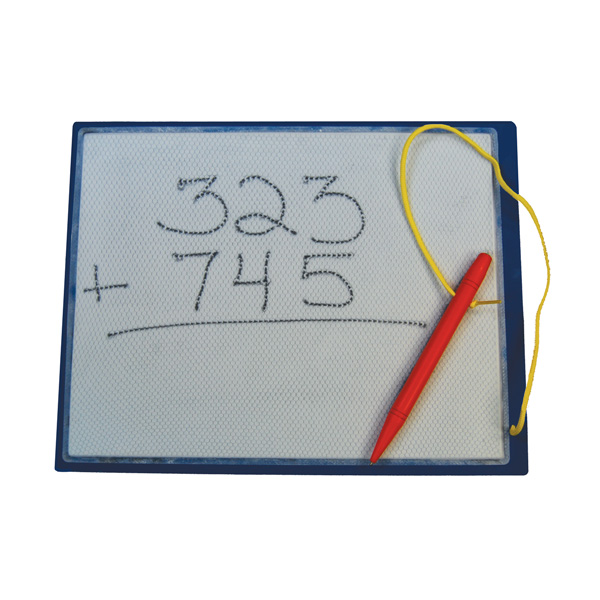
-I love these slates because I don't have to deal with dried out expo markers anymore :) No idea how much they cost...our principal bought them for us.
-My lessons are based off the core and not our textbook. I do use the textbook but I pick and choose a lot!


After my students meet with me they do
at your seat
-They complete their assignment when they are at their seat. 
-Sometimes each group has the same assignment and sometimes not. Completely depends on what they need.
-My assignments either come from the book or are written out on the board. The students use a simple piece of lined paper folded into eighths. In the first box they write their name, date, assignment. The rest of the boxes are numbered and used for the assignment. Answers are written in the bottom right corner of each box. If a student is having trouble lining number up (like when doing double digit multiplication) then I have them turn their paper sideways and use the lines on the paper to help them.
-Now, I ALWAYS get asked how I help these students when I am teaching another group. I have trained my kids on how to help each other. If a kid needs help then they ask the kids in their group. If that doesn't work then the 2 teacher helpers need to be asked. If they still can't figure it out they come and stand by my table *with the two teacher helpers* to let me know they need help and when I get a chance I help them. Very rarely do I have kids stand at the table to get my help.
-All answers to the assignments are submitted in a Google Form. This way I can see at a glance who needs intervention. I am going to do a blog post about how I use Google Forms in my room soon.


technology
-So I am blessed. In many ways, but I am blessed at school to have a class set of Chromebooks. I LOVE CHROMEBOOKS! So much better than tablets or laptops. In fact, I always explain to people that a Chromebook is a tablet and laptop smooshed together. 
-My students always start with an xtramath lesson. See my post on xtramath here. This takes anywhere from 5-10 minutes. This is basic math facts practice and review.
-My district has purchased i-ready and I love it! The students do a benchmark three times a year and are then given lessons based on their level. So my students do an i-ready lesson everyday. The lessons are fun and interactive!


hands on
-This one is different all the time! It is by far the favorite. Here is a list of activities I incorporate during the "hands on" rotation.
     -task cards
     -buddy games
     -independent games
     -file folders
     -card games
     -using manipulatives
-If students get too rowdy during this time they are given one warning. If I have to stop them again then this rotation is taken away. I have only had to take it away once this year.


So, that is an overview of math rotations in my room. I would LOVE to know how your math workshop runs. Enjoy the rest of your break :)

November 8, 2013

Class Set of Chromebooks!

These past few weeks my classroom has changed. Completely. And I love it! Have you ever heard of a Chromebook?


Well my amazing readers, this little beauty is fabulous! The model above is only $249 and you can see my review here

Ready for my EXCITING NEW!!!???!?! 

My class is piloting a class set of Chromebooks for our district! And oh, how we are loving it!


These computers run completely on Chrome, which means nothing needs downloaded or fixed by the tech department. All updates are taken care of by Google online. If there is an update then all you need to do is shutdown the Chromebook and restart. Oh, and the restart take 8 SECONDS! Not even joking. If a student restarts their computer it will be ready in a complete rodeo bull ride. 


Okay, so how do I utilize this amazingness you might ask...Here it is in a nutshell...
-Google Drive is used A LOT in my room. 
-Students do all their writing online
-Math assignments are submitted online
-All assessments are taken online (and corrected instantly)
-Students practice math facts
-Review math standards
-Do differentiated assignments
-Use science labs
-Listen to reading
-Log their reading
-Do Word Work (see post here)
-Complete Work on Writing


That is all I can think of right now! Our classroom is having a blast. Motivation has skyrocketed and so has the work ethic of my students. They are eager to get on the Chromebook and get to work.

I have so much to share with you all about how we are using Chromebooks! Please stay tuned ~

November 5, 2013

SpellingCity Review (used with Words Their Way)

Linking up with the amazing and fabulous Holly for Tried it Tuesday! I LOVE Tuesday just because of this linky :)

So, I have been using SpellingCity.com for part of our Word Work and for spelling tests.


This has been going on for a while now and I love it more and more every week! I use the free account. First of all, I differentiate my spelling groups using Words Their Way. This is the BEST for differentiating spelling. I have used it for 8 years now and still love it. In the past 8 years I have never had a parent complaint about spelling. Now just because I said that I will probably have one this week. Ha!

Anyway, here is how we use Spelling City in our classroom...

On our class blog there is a link:

Which takes my students directly to my teacher page on Spelling City. On my teacher page are the lists for each group:

The groups are posted on the wall and the students know which group they are in. After they click on their group, their list is brought up. At the top of the list they can only do the free activities, but there are plenty!


Here are the free activities:

My students use them all! I also print out the Handwriting pages for each group and make them do that for Word Work as well. The handwriting of my students is atrocious this year!

Now, you all need to go link up with Holly!


May 29, 2013

Chromebook Review

Happy Tuesday everyone! I am linking up with the fabulous Holly for

Okay fellow teachers...I LOVE my Chromebook. If you are even considering getting one, then you must! I wasn't sure how I was going to like transferring over to only Google Drive, but I can successfully say that it was smooth and wonderful. I learn more everyday about my Chromebook and love it!

Here is my official review on everything I know about my Chromebook...

First off...it is $249 people! You can't beat this!

1. A Chromebook is an internet based laptop with a super quick start-up time. Seriously. To start my machine all I need do is open it and everything is ready. Love this about it.

Everything is based on Chrome and functions using the internet and apps. I didn't think I would be able to go away from my beloved Microsoft Office (Publisher and I were amazing friends) but I have evolved! I now solely use my Chromebook and Google Drive.

2. I have the Samsung which is 11.6 inches. I am loving the size!
 
I actually have this case for it and I put my Chromebook and my iPad in the case and then in my purse and away I go!
Product Details


3. Keyboard
The keyboard is normal with letters and numbers. The differences are:
-The Cap Locks key is actually a search key for your Chromebook. I've used it a few times and like it!
-The smaller buttons at the top of the keyboard are (in order from left to right) esc key, back and forward for your browser (love these keys), refresh your browser, minimize/maximize key, toggle between open documents/browsers (or hit ctrl and this key to get a screen shot), brightness keys, volume keys, and power button.
-The keys are also lowercase.
-There is no 'delete' key.

I have to say the keyboard has been simplified and it works amazingly! 


4. Touchpad is fabulous!

It has the basics of a regular touchpad, but it is so much cooler! To scroll you simply move two fingers on the touchpad up and down or left to right. To right click you tap with two fingers. The entire touchpad is clickable.


5. Internet connection reach is pretty good. We share the internet with relatives who live next door (about 75 yards away) and the router is at their house. My Chromebook easily connects and works well.


Now let's talk about Google Drive and how I am learning to love it more everyday!

1. There are five options to choose from when creating anything using Google Drive.
-Document is like Word
-Presentation is like Power Point
-Spreadsheet is obviously Excel
-Form is amazing and you can create questionnaires, quizzes, etc.
-Drawing is where you can create any sort of drawing and save it as a jpeg

These are a bit different but pretty much function the same as Microsoft Office. I use Document and Presentation a ton as well as Drawing to create my units and assignments. 


2. Before getting my Chromebook I was starting to use Dropbox, but I realized by using Google Drive I have the same benefits but I don't need to download anything on any computer. It is so much easier too, especially now because I create everything in Drive anyway.


Classroom use of the Chromebook...
I see so many possibilities for using this sweet little thing in my classroom, especially if I had a class set :) There are a ton of educational apps that you easily put on to your Chromebook for free. I will the list of apps I am creating, but I will say my 4 year old daughter loves using the Chromebook for its apps. She can easily use the Chromebook as well.


I know this wasn't a super in depth review, but I will definitely post more about my little machine!